✦ Introducing Sandman ✦
Stop paying your Azure VMs to do nothing
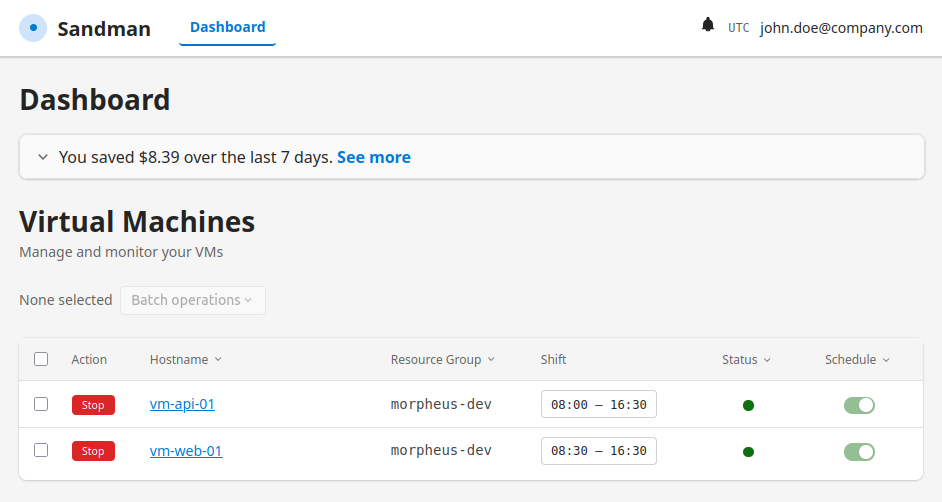
Sandman automatically shuts down Azure VMs when shifts end, notifies users via Microsoft Teams, and lets them postpone with one click — so you save money without disrupting anyone.
How It Works
1
Schedule
Define shift start & end times for each VM through the admin dashboard
2
Notify
At shift end, the user gets a Teams message: “Can we stop your machine?”
3
Postpone
Need more time? Pick 1–3 hours directly from the Teams card with one click
4
Deallocate
VM shuts down automatically — savings are logged to the dashboard
Trust & Compliance
SSO — Microsoft Entra ID
Sign in with Microsoft Entra ID—no separate Sandman password. Access follows your existing users, groups, and identity policies (MFA, conditional access).
Self-Hosted on Your Azure VM
Deploy on a VM in your Azure subscription—credentials and data stay in your tenant. Connects through your app registration, not a shared SaaS backend; you choose region and hardening.
Made in EU
Developed and supported from the Czech Republic (EU). Built for teams who want cloud savings without sending management data overseas.
Pricing & Estimated Savings
Enterprise
Private offer
- Custom VM limits & pricing
- Extended support & SLA
- Dedicated onboarding
- Not a public Marketplace plan